
Policy Scanner: Automatically identify the rules that drive your policies and procedures
Point Policy Scanner at a policy and it reads the document the way an examiner would — surfacing the laws, rules, and regulations that create obligations, mapped section by section and scored by relevance.
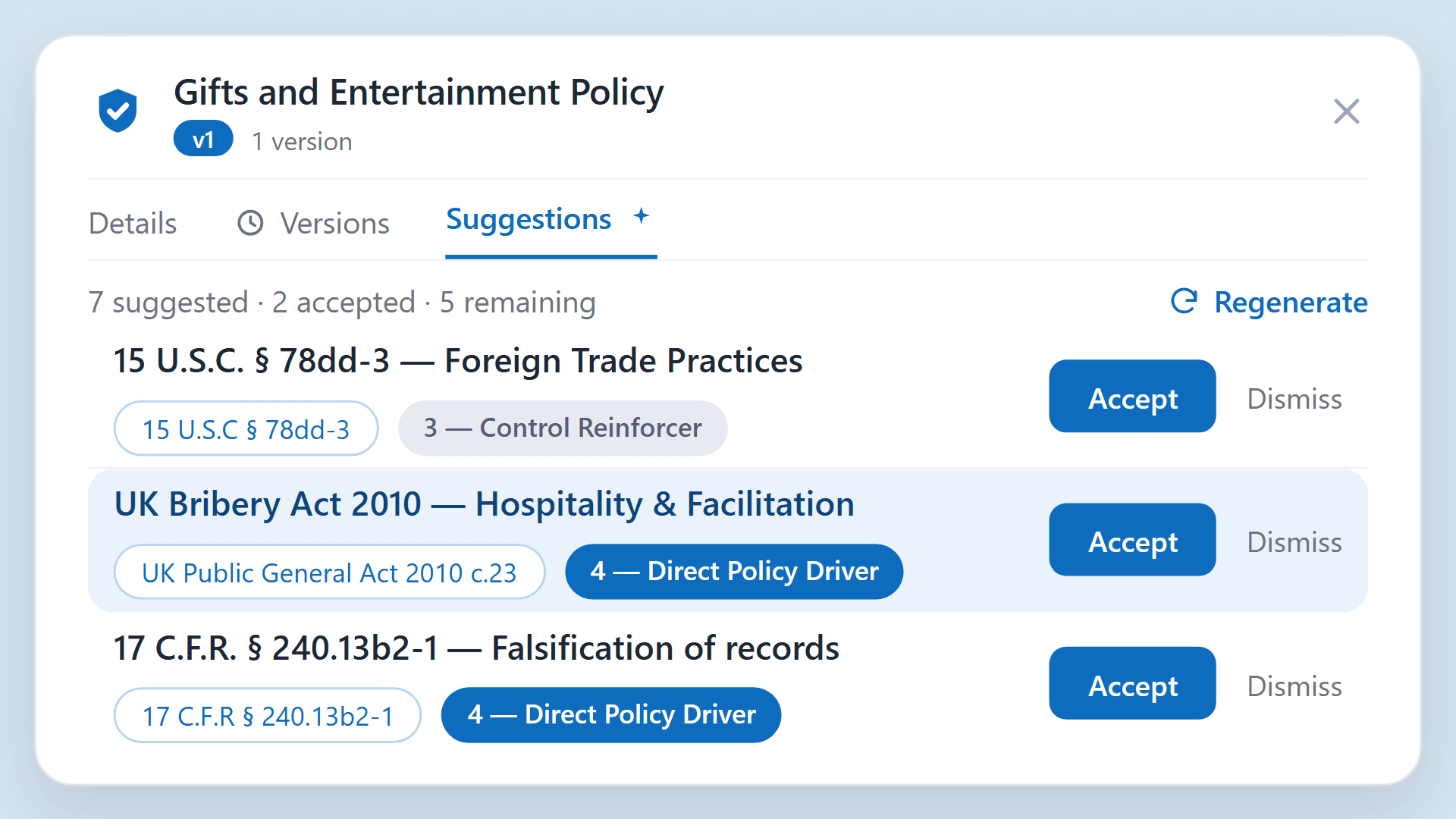
Are you confident that, for every policy you maintain, the rules that drive it are well documented? If you don't know which rules your policy has to comply with, how can you know whether it's compliant at all?
Sometimes a policy cites each rule it addresses right inside the document. More often it doesn't — or the references are a hodgepodge, accurate in places, stale in others, and silent on the obligations nobody thought to map. The complete answer usually lives in someone's head. Responsiv's Policy Scanner closes that gap: point it at a policy and it reads the document the way an examiner would.
The problem it solves
Mapping a policy to the rules behind it is slow, manual work, and full of blind spots. Someone has to read the policy, hold a mental model of the relevant regulations, and match each section to the obligations it's meant to satisfy. You then need to figure out what's missing. Done properly it takes days, it goes stale the moment a rule changes, and it's exactly the kind of cross-referencing an examiner probes when they ask "which requirement does this address?"
How it works
Upload a policy or procedure and Policy Scanner analyzes the full text, parses out the rules mentioned in the text, then identifies the laws, rules, and regulations that create obligations relevant to it that may be missing. You get back:
- A ranked list of driving rules — the regulations that generate obligations for this policy, scored by relevance so the most material ones rise to the top.
- Section-by-section mapping — which part of the policy speaks to which obligation, so the connection is traceable rather than asserted.
- Coverage gaps — obligations that apply but aren't addressed anywhere in the document, surfaced before they become findings.
The workflow, step by step
1. Upload a policy
Start from the policy's record — its description, region, business units, and owner — and upload the document (or a new version). That's the only setup required; Policy Scanner works from the full text, so there's nothing to tag or pre-structure.
2. Ask for suggested obligations
Open the policy's suggestions and click Generate Suggestions. If you want to steer the analysis, add a short prompt to scope it — for example, "focus on data privacy" or "limit to EU regulations" — or leave it blank to let Policy Scanner consider the full regulatory landscape.
3. Review the output
Suggestions come back as a ranked list, each one citing the specific rule it maps to (for instance, 15 U.S.C. § 78m), a short rationale for why it applies, and a relevance score that flags whether it's a direct policy driver or a control reinforcer. Work through them one at a time — accept the ones that fit, dismiss the ones that don't — or accept them all at once and refine later. Not happy with the set? Add a sharper prompt and regenerate.

An example
Take a supervision policy at a broker-dealer. Run it through Policy Scanner and it surfaces the FINRA and SEC obligations the policy is actually responding to — supervisory system requirements, written procedures, review and documentation duties — each tied to the section of your policy that covers it, and each scored so you can see what's central versus peripheral. What used to be a multi-day manual exercise becomes a starting point you have in minutes.
Why it matters
Three things change once you can identify driving rules on demand:
- Defensibility. When you can show the rule behind every policy section, exams get a lot less stressful.
- Speed. New or updated policies can be checked against the regulatory landscape immediately, not whenever someone has a free week.
- A head start on your register. The obligations Policy Scanner surfaces are the raw material for a living register — so this isn't a one-off check, it's the first step toward connected compliance.
Where it fits
Policy Scanner pairs naturally with Policy Manager and your LRR register. Scan a policy to find the rules that drive it, manage that policy and its obligations in one place, and let the register keep the mapping current as regulations change. One workflow, from document to defensible.